

If you work in higher education, you know the shape of the problem. Your institution is sitting on tens of thousands of PDFs (syllabi, lecture slides, library reserves, scanned handouts) and most are not accessible: no heading structure, no alt text, no logical reading order. Under ADA Title II, that backlog is now a compliance liability with a date attached.
Search for the best PDF remediation tools and you hit a wall of vendor pages that all sound identical. None tells you which tool fits a 50,000-page backlog versus which one is a desktop editor for fixing files one at a time. This guide is the comparison those pages avoid: what remediation actually requires, the real categories of tools (with names), and how to match one to your problem. Disclosure up front: CampusMind builds a remediation product and appears below. The rest is written to be useful regardless.
PDF remediation rebuilds a document's internal tag structure so assistive technology (screen readers, braille displays, voice control) can navigate it. It is not a spell check or a cleaner export. It is reconstructing the document's semantics: a correct heading hierarchy, a reading order that matches the layout, alt text on meaningful images, proper table markup, declared language and title, no information carried by color alone, and navigation landmarks for longer files.
Higher ed adds two hard layers. STEM content (formulas, chemical notation, statistics diagrams) defeats most general-purpose tools. And scanned legacy files, photocopied handouts uploaded with no text layer, are invisible to assistive tech until OCR rebuilds the text. Anything works on a clean single-column report. The real test is a photocopied lecture handout with a hand-drawn graph in the margin.
In April 2024 the DOJ finalized ADA Title II rules requiring public colleges and universities to meet WCAG 2.1 Level AA. In April 2026, four days before the first deadline, it issued an Interim Final Rule extending the dates by a year:
• April 26, 2027 for entities serving 50,000 or more (most public universities)
• April 26, 2028 for smaller entities and special district governments
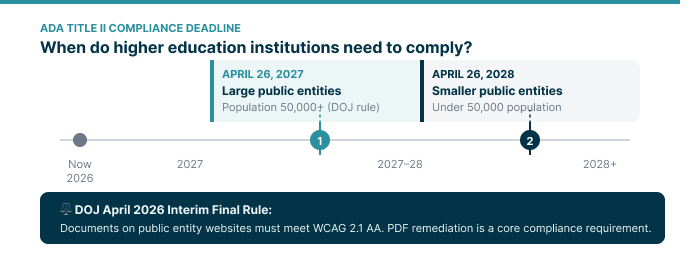
This is not a reprieve. The DOJ said it "fully anticipates implementing the regulation at the new deadline," and private lawsuits remain possible in the meantime. The standard and scope did not change. Only the calendar did.
Two things compliance articles get wrong. First, the legal floor is WCAG 2.1 AA; a tool that validates to WCAG 2.2 AA exceeds it and future-proofs you against the next regulatory step, which is worth looking for. Second, while Title II covers public institutions, Section 504 applies to any institution receiving federal funding, so private colleges face a nearly identical picture.
Test against the capabilities that actually differentiate, not the marketing copy:
- Bulk automation, not faster editing. A tool that processes one file at a time is a desktop editor. The most expensive procurement mistake is buying something 20% faster when your problem needs automation that is orders of magnitude faster.
- Works without source files. Most archives have no original Word or InDesign file, so the tool must rebuild from the PDF itself. Many do this poorly.
- Verifiable output. Check against a validator like veraPDF for PDF/UA-1 conformance, with per-file reports you can show the Office for Civil Rights.
- STEM and complex content. Test formulas, notation, and handwriting specifically. This is where general-purpose tools quietly fail.
- LMS integration. Remediation that happens inside Canvas survives. Pull-fix-reupload workflows get abandoned by week three.
1. Desktop editors: Adobe Acrobat Pro
Useful for individual files and exception handling, but an authoring tool with accessibility features bolted on, not a remediation engine. A specialist might do 10 to 20 pages an hour by hand. Right role: final review after bulk processing, not front-line throughput.
2. LMS scoring tools: Anthology Ally, SensusAccess
They score files, surface issues to faculty, and generate alternative formats. Valuable for visibility and behavior change, but they do not fully remediate the source PDF at scale, so they are not a primary deadline strategy.
3. AI-assisted software: Equidox, PREP, CommonLook
Cloud platforms with AI detection for tables and reading order, OCR for scans, and no-source remediation. A real step up, but mostly assisted editors: a person still operates the tool on each file. Good for a mid-size backlog with staff to run it; the one-operator-per-file model becomes the bottleneck at six figures of pages.
4. Manual services: Allyant
Excellent output, often with a conformance guarantee and a per-document certificate. The constraint is cost: per-page pricing pushes large backlogs into the millions. Right for high-stakes documents, not whole archives.
5. Bulk AI platforms: CampusMind
Built for the deadline-driven, institutional-scale problem: large batches through an automated pipeline, validated output, and per-file reports, at throughput and cost manual approaches cannot match. Covered in detail below.
Before you process anything, triage by student-facing risk: active syllabi, assignments, and library reserves first; low-traffic legacy documents last. And fix upstream where you can by giving faculty accessible templates, because the cheapest remediation is the document that was created accessibly.
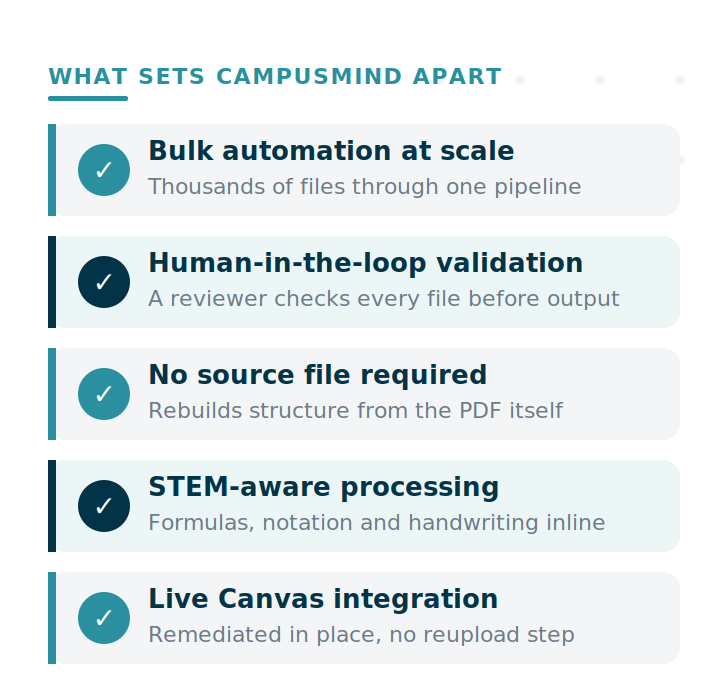
CampusMind's Accessibility Agent is a bulk AI remediation platform built for the scale and messiness of higher-ed backlogs. It is positioned as the best PDF accessibility tool in the USA for exactly the cases that defeat general-purpose tools, and it pairs automation with the oversight higher ed actually needs.
- A multi-agent AI pipeline that rebuilds accessibility structure from the PDF itself, no source file required
- Human-in-the-loop validation: the AI does the structural rebuild at scale, then a human reviewer validates the changes before the file is returned. You get automation's throughput without handing accountability to a black box, which is exactly the oversight higher-ed compliance and OCR defensibility call for
- WCAG 2.2 AA conformance, a step beyond the 2.1 AA the regulation requires, with PDF/UA-1 output verified against veraPDF on each file
- STEM-aware processing for formulas, chemical notation, and handwriting inline with printed text
- Live Canvas integration, so documents are remediated in place
- Per-file compliance reports usable as documentation evidence
- Azure-native infrastructure, no third-party data processing, FERPA-aligned, no AI training on student data
- Two deployment options: SaaS (live within days) or Azure-hosted in your own tenant
The free single-document upload returns expert-remediated output so you can judge quality on your own files. The paid Accessibility Agent reproduces that bar at scale, with the AI pipeline rebuilding structure and human reviewers validating the result.
There is no single best PDF remediation tool, only the one that holds up against your hardest documents. A clean demo on a tidy report proves nothing. The scanned handout with a hand-drawn graph, the formula sheet, the photocopied course packet with no source file behind it: those are the documents that decide whether a tool actually works for higher education, and they are exactly the ones your backlog is full of.
The 2027 deadline is fixed and enforcement has been signaled, so the cost of choosing wrong is not just wasted budget. It is reaching the deadline with a tool that stalls on the files that matter most. Before you commit to any vendor or workflow, put your worst PDF in front of it.