ACCESSIBILITY USECASES

PDF Accessibility Remediation: Before and After Transformation

Fix inaccessible PDFs at scale with AI. Improve read order, tagging, and structure for stronger accessibility and faster remediation.

Why PDF Remediation Gets Hard

Higher ed teams are managing years of inaccessible PDFs across courses, archives, and public documents. Manual remediation does not scale, especially when files need more than simple cleanup. Many require fixes to structure, tagging, reading order, tables, and image descriptions before they are usable with assistive technology.

How CampusMind Accessibility Agent Helps

CampusMind helps institutions remediate complex PDFs at scale, from scans and photocopies to handwritten notes and multi-column layouts. CampusMind Accessibility Agent identifies issues, improves structure, and strengthens reading order and meta-tagging, giving teams a faster way to handle large volumes of remediation work.
an illustration of pdf accessibility problems
From Textbook Photocopy to Accessible PDF
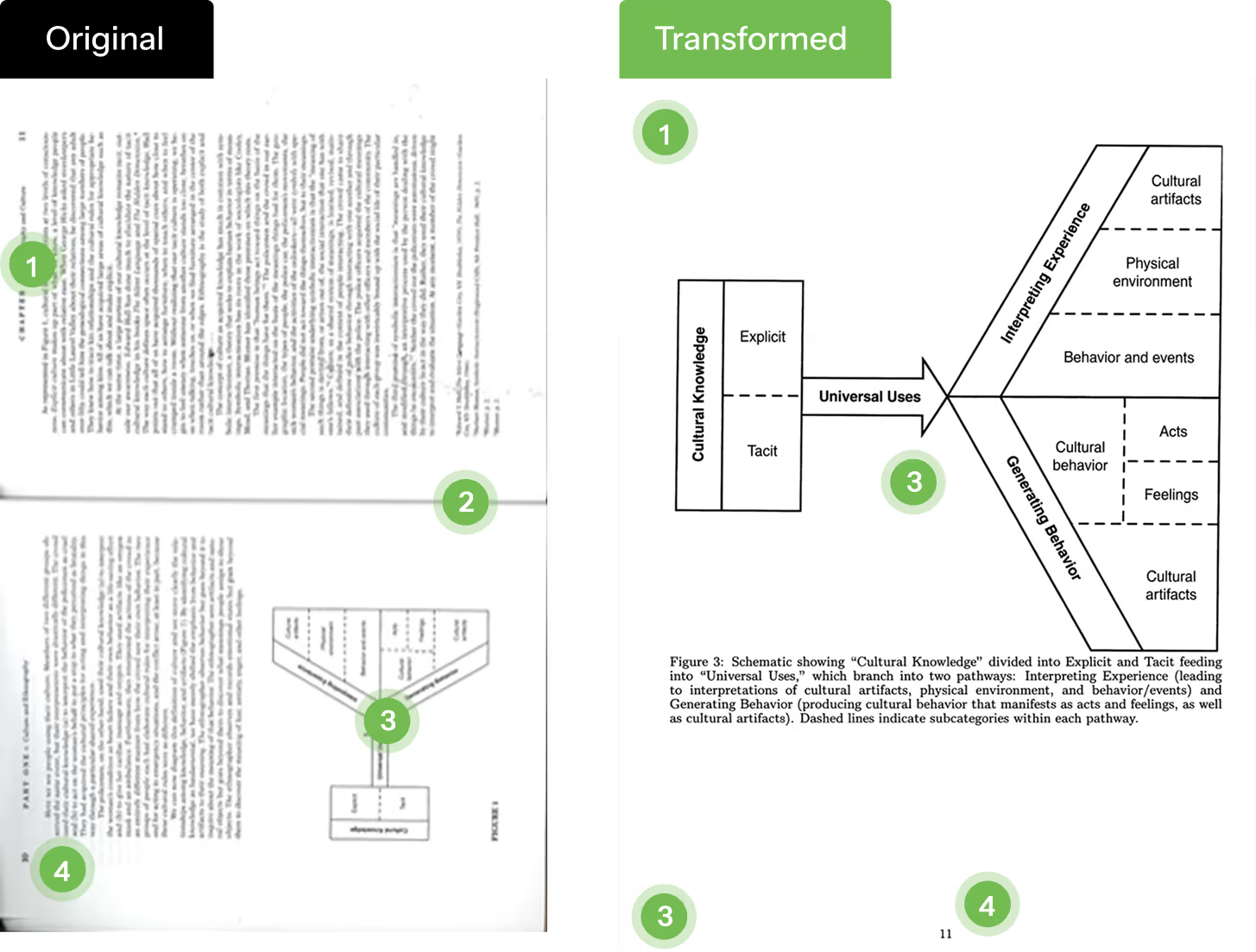
This ethnography source began as a double-page textbook photocopy with a two-column layout and embedded diagram, which made the document harder to navigate with assistive technology. CampusMind’s PDF accessibility remediation improved read order, page structure, and diagram accessibility while preserving the meaning of the original content.
an illustration of pdf accessibility problems
How This Textbook PDF Was Remediated
Two-Column Read Order Fixed
The original textbook page used a two-column layout with an image inset, which can break screen reader flow. The remediated PDF preserves the correct reading order so the content is read in a logical sequence.
Double-Page Photocopy Split Correctly
The source file was a photocopied spread rather than a clean single page. PDF accessibility remediation separated the content into a more usable page structure without losing context.
Diagram Description Added
The visual diagram was made more accessible with descriptive support so non-sighted users can better understand the relationships between elements.
Original Page Numbering Preserved
Page numbering from the source content was retained, helping preserve citation context and document continuity after remediation.
Fixing a Handwritten STEM PDF for Accessibility
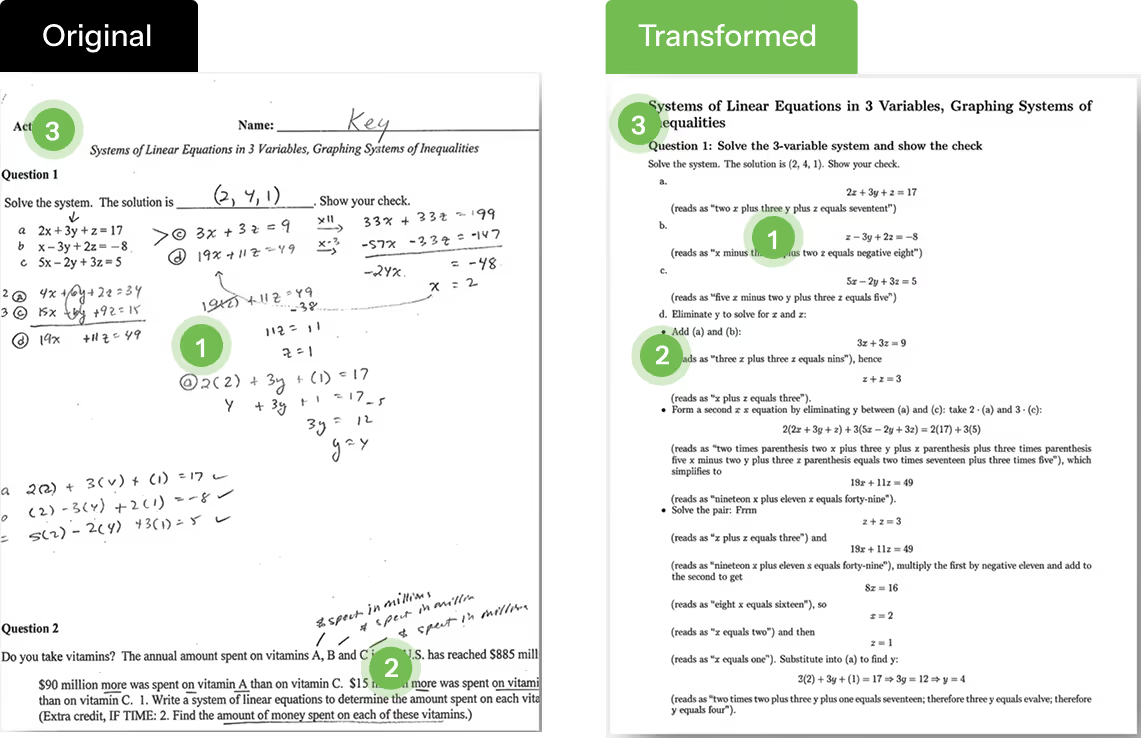
Text and Handhe original file combined typed questions, handwritten work, and formulas in a format that was difficult to navigate with assistive technology. With accessible PDF remediation, the content was restructured for better read order, clearer headings, and improved screen reader access.written Combinations in STEM classes (Accessibility)
an illustration of pdf accessibility problems
Accessibility Improvements Made
Read Order for Handwritten Content
Maintain read-order even in scenario even when you have freely written text annotations
Formulas Made More Readable
Math expressions were supported with clearer structure so they are easier to follow with assistive technology.
Document Structure and Headings
The document was reorganized with a stronger heading hierarchy to improve navigation and document flow.

Try PDF Accessibility Remediation Instantly

Upload your PDF and see how fast it can become accessible and compliant—no setup required.
Upload your PDF
Accessible PDF Remediation for Low-Quality Photocopied Notes
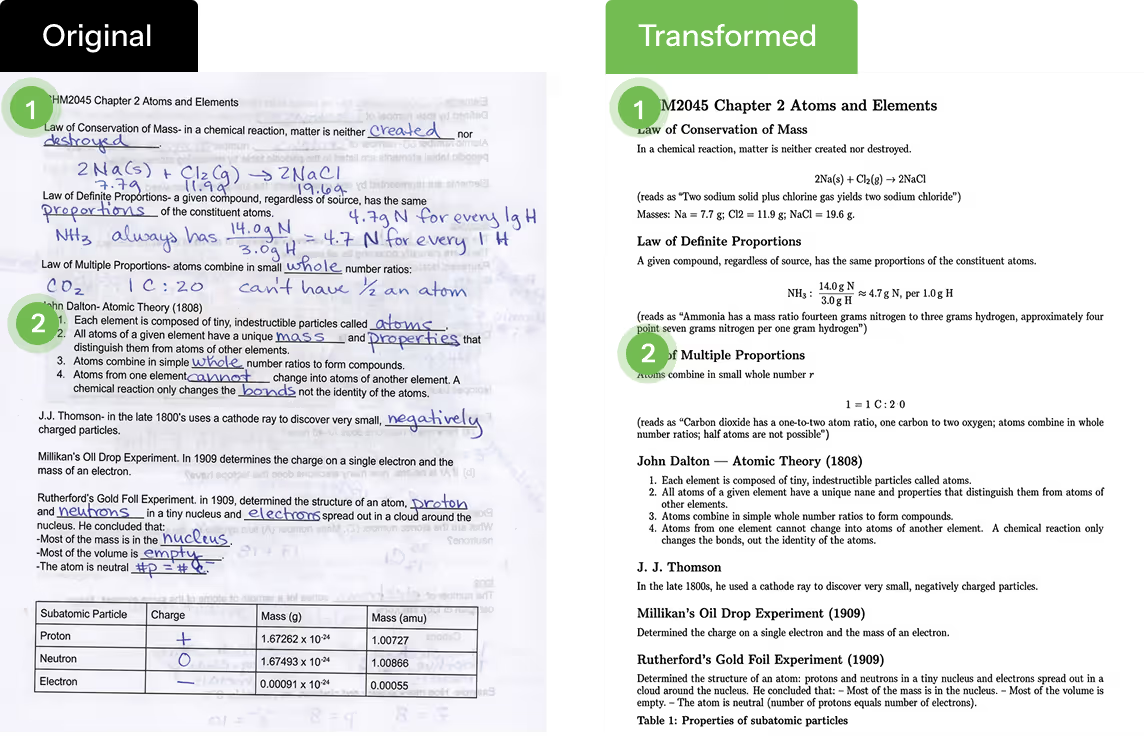
This file started as a poor-quality photocopy with skewed text, handwritten annotations, and bleed-through from the reverse side of the page. CampusMind’s PDF accessibility remediation helped clean up the structure, preserve inline meaning, and make the document easier for screen readers to interpret.
an illustration of pdf accessibility problems
How the PDF Was Remediated
Low-Quality Scan and Bleed-Through
The original file has content from other side of the page.  Original PDF is often askew or sideways for text books.
Handwritten Notes Preserved in Read Order
Original text in OCR or handwritten text incorporated together maintaining inline read-order.
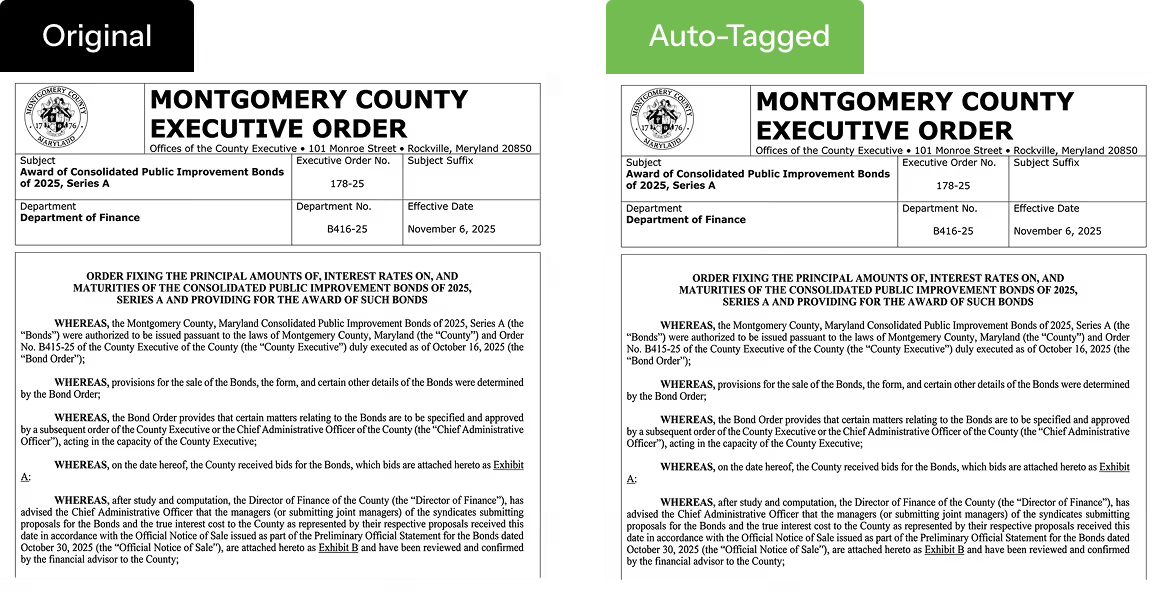
Executive Order PDF Remediation
This government-style document needed accessible PDF remediation while keeping its print-ready format intact. The remediated version improves structure, headings, and document properties without visibly changing the page.
an illustration of pdf accessibility problems
How This Executive Order PDF Was Remediated
Formatting Preserved
The document keeps its original visual layout, which is important for formal public records and administrative files. In other words, the document does NOT change visibly.
Accessibility Metadata Added
Key metadata such as title and language were applied to support better accessibility and document identification.
Headings and Navigation Improved
The PDF was structured with clearer headings and bookmark support to make navigation easier for assistive technology users.
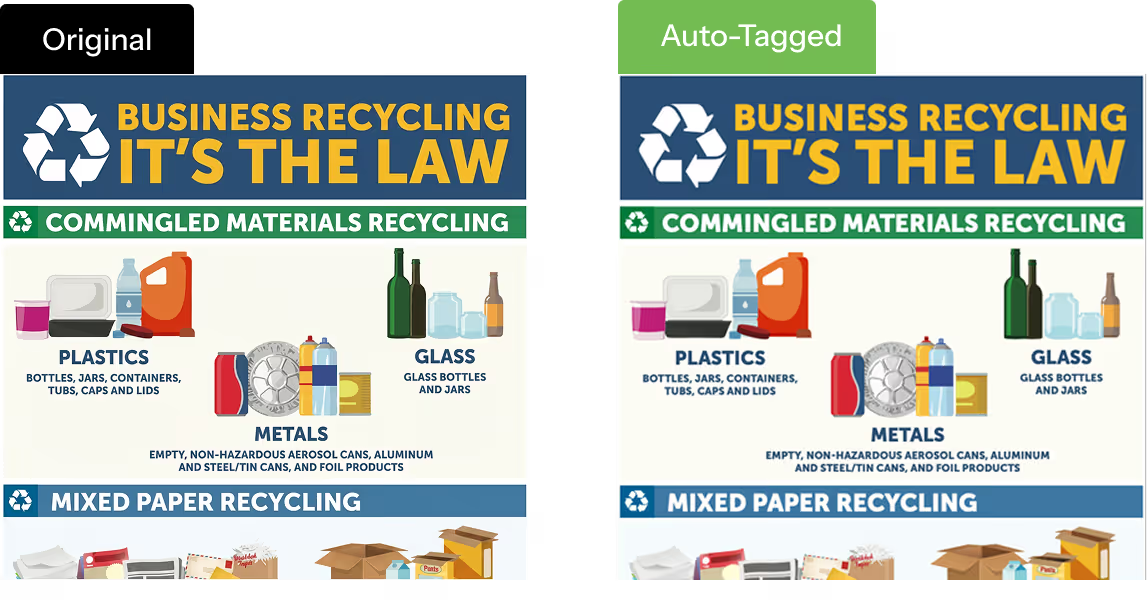
Making Public-Facing PDFs More Accessible
This government application graphic needed accessible PDF remediation without changing its visual design. The remediated version improves document structure, metadata, and navigation while preserving the look of the original public-facing document.

an illustration of pdf accessibility problems
How This Public Document PDF Was Remediated
Visual Layout Preserved
The original poster-style design stays intact, which is important for public communication materials that rely on formatting and visual hierarchy.
Metadata Added for Accessibility
Accessibility metadata such as title and language were applied to improve document identification and assistive technology support.
Structure Improved for Naviga
Headings and bookmarks were added to make the PDF easier to follow with assistive technology.

See How PDF Accessibility Remediation Works on Real Documents

Reduce manual effort, improve document accessibility, and see how CampusMind supports high-volume remediation across complex PDFs.
Get Accessibility Quote
FAQ

Frequently Asked Questions

Everything you need to know about the accessibility offerings.
What is PDF accessibility remediation?
PDF remediation rebuilds a document's hidden structure so screen readers can actually read it. The file looks identical on screen. What changes is everything underneath — reading order, image labels, table tags. Same content, different access.
Why does PDF accessibility matter in higher education?
PDFs run higher ed. Syllabi, readings, scanned chapters, lecture notes — most of what a student needs to pass a course sits in a PDF somewhere. When those files aren't accessible, students using assistive technology lose the material everyone else is working from. The ADA and WCAG carry real legal exposure. The bigger reason is simpler: no student should enrol expecting the materials weren't built for them.
What does WCAG 2.1 AA PDF compliance actually involve?
It is never one fix. Three areas usually carry the most weight: properly tagged headings, so students can jump between sections instead of starting from the top; alt text that describes what the image is actually showing; and a reading order that holds up on multi-column pages. Tables, formulas, and language tags matter too. Those three are where most documents fail first.
Can AI remediate a large PDF backlog?
Yes — and at scale, it is the only thing that works. A university sitting on 5,000 legacy PDFs cannot remediate them by hand before a deadline. The math does not add up. AI handles tables, formulas, and the messy multi-column layouts in seconds. A reviewer focuses on the files that genuinely need a second look. That is the difference between hitting April 24, 2026 and missing it.
What is the difference between WCAG and PDF/UA?
WCAG is the broad accessibility standard for digital content: sites, apps, documents, media. PDF/UA is narrower. It covers only how PDFs must be tagged and structured. They overlap, but passing one does not mean passing the other. A document can clear a WCAG checker and still fail PDF/UA, which usually points to a real screen reader problem the surface checks missed. Treating one as a substitute for the other is how compliance programs quietly fall apart later on.
How do you remediate PDFs without the original source files?
Most campuses do not have the source files anymore. Scanned PDFs, inherited documents, uploads from staff who left years ago — the original Word or InDesign files are gone. Traditional remediation needs that source. The CampusMind Accessibility Agent does not. It rebuilds the accessibility structure inside the PDF itself, using a multi-agent AI process to interpret the document the way a remediation specialist would. For older backlogs, that is usually the only realistic route to compliance.