Help Students Evaluate Major Changes with Clearer, Faster Degree Mapping
Automate credit intersection analysis to show how completed coursework applies to a new major, reduce manual advising effort, and give students better visibility into academic pathways.
Major change advising is often manual, slow, and difficult to scale. Advisors spend significant time reviewing completed coursework, comparing it against target program requirements, and explaining what will transfer and what remains. Students, meanwhile, often lack a clear view of how switching majors will affect their academic progress, timeline, and remaining credits.
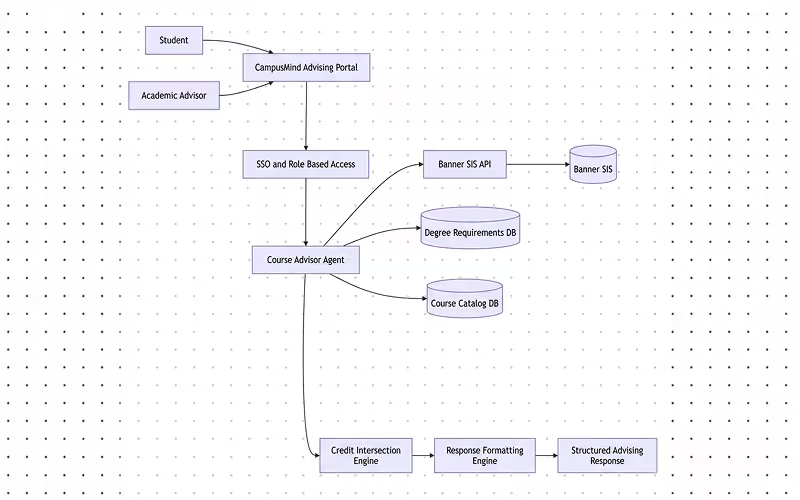
CampusMind’s Course Advisor Agent helps streamline this process by integrating with the SIS, analyzing completed coursework against target degree requirements, and generating structured advising outputs. It can identify accepted credits, highlight remaining requirements, estimate time to completion, and support consistent advising workflows. The result is a faster, more transparent major change evaluation process with less manual effort for staff.
How It Works
- Student Data Integration: The agent integrates with the Banner SIS, accessing the student’s completed courses, grades, and the target degree’s requirements.
- Credit Intersection Analysis: The agent analyzes the intersection between the student’s completed courses and the new program’s requirements, identifying which courses will transfer and which new courses are required.
- Report Generation: The agent generates a detailed report that includes a list of accepted credits, remaining requirements, and an estimated timeline to complete the new major.
- Advisor Workflow: The agent automates the major change advising process, freeing up advisors to focus on complex cases. It also ensures that all advising is consistent and aligned with institutional policies.
- Student Transparency: Students receive a clear summary of their major change implications, including the credits that transfer and what is still required, allowing for better decision-making.
What Students Gain
- Clearer visibility into how a major change affects academic progress
- A better understanding of which completed courses still apply
- Faster insight into remaining requirements and likely next steps
- More confidence when evaluating different academic pathways
- Less back-and-forth while waiting for manual review
What Advisors and Faculty Gain
- Less time spent on manual degree mapping and credit review
- More consistent guidance across students and departments
- Faster turnaround for major change evaluations
- Clearer outputs to support advising conversations
- More time to focus on complex or high-impact cases
How to Set It Up
- Integrate with SIS: Set up the integration between the Course Advisor Agent and the Banner SIS to pull the necessary academic data.
- Configure Degree Requirements: Upload and configure the degree program requirements for all potential target majors within the system.
- Customize Output Reports: Define how the agent should present the credit transfer information, including any required academic pathways and policy rules.
- Deploy and Monitor: Once the system is set up, deploy the agent to assist students in evaluating major changes. Advisors can use it to guide students through the process, with manual review available if needed.
Tech Stack
- Banner or Workday SIS Integration for accessing student data and degree courses requirements
- AI Framework: CampusMind AI Agent Studio
- Data Processing: Credit intersection and program requirement matching
- FERPA Compliant Data Handling
- Cloud Platform: Azure (SaaS or Private Cloud options)
- Integration: Degree program databases and course catalogs