Deliver Course-Aware Student Support Inside Brightspace
Help students get timely answers, prepare more effectively, and stay supported within the LMS while reducing repetitive instructor workload.
Students often need help outside class hours, while instructors spend significant time responding to repetitive course-related questions. At scale, that creates support delays, inconsistent responses, and less time for teaching. It also makes it harder to identify where students are getting stuck until those issues start affecting performance.
CampusMind’s Virtual Teaching Assistant integrates with Brightspace through LTI 1.3 to provide always-available support grounded in course materials. It can answer student questions, support study and quiz preparation, and help instructors monitor common questions, engagement patterns, and areas that may need reinforcement.
How It Works
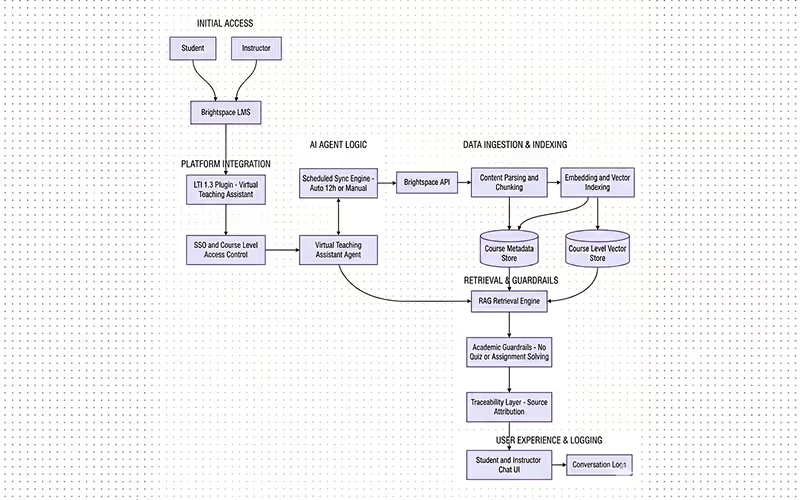
- LMS Integration: The VTA integrates directly with Brightspace through an LTI plugin, pulling course content like modules, PDFs, assignments, and discussions to train the assistant.
- 24/7 Student Support: Students can ask questions about their course content and receive instant, accurate responses based on the material taught.
- Adaptive Learning: The VTA can provide tailored study assistance, such as practice questions and quiz preparation, based on the student's progress and course schedule.
- Instructor Insights: Instructors receive actionable insights into common student questions and topics that need reinforcement, helping them optimize course delivery.
- Real-Time Updates: The VTA continuously syncs with Brightspace to stay updated with new course materials, assignments, and deadlines.
What Students Can Do With It
- On-demand help directly inside Brightspace
- Faster answers grounded in course materials
- Better support outside office hours
- Help preparing for quizzes, assignments, and exams
- A more consistent way to review concepts and course content
What Instructors Gain
- Fewer repetitive course questions to answer manually
- More time to focus on teaching and student support
- Visibility into common student questions and confusion points
- Better insight into where reinforcement may be needed
- A scalable support layer that stays aligned to course content
How to Set It Up
- Integrate with Brightspace: Use the LTI 1.3 integration to add the VTA to your institution’s Brightspace platform.
- Upload Course Content: Make sure your course materials are available in Brightspace, as the VTA uses these to provide relevant answers to student questions.
- Customize Interaction: Adjust the VTA's conversational tone, level of detail, and feedback style to align with your institution's teaching approach.
- Deploy and Monitor: Once set up, the VTA will automatically assist students, and instructors can monitor its performance through the provided dashboard for continuous improvement.
Tech Stack
- LTI 1.3 Integration for seamless Brightspace connection
- AI Framework: CampusMind’s AI Agent Studio (for training and deployment)
- Natural Language Processing (NLP) for answering student queries
- Adaptive Learning Engine for quiz and study support
- FERPA Compliant Data Handling
- Cloud Platform: Azure (SaaS or Private Cloud options)