Accelerate Transfer Credit Evaluation Across Your Institution
Accelerate Transfer Credit Evaluation Across Your InstitutionTransfer credit evaluation is one of those processes that looks simple from the outside and becomes messy the moment real transcripts enter the picture.
Different institutions. Different course names. Missing details. Scanned PDFs. Quarter credits, semester credits, older course catalogs, repeated courses, electives that may or may not count, and students waiting for an answer that can affect where they enroll, how long they stay, and how much they pay.
For admissions teams, registrars, and advisors, that means a lot of manual checking. Transcript by transcript. Course by course. Rule by rule.
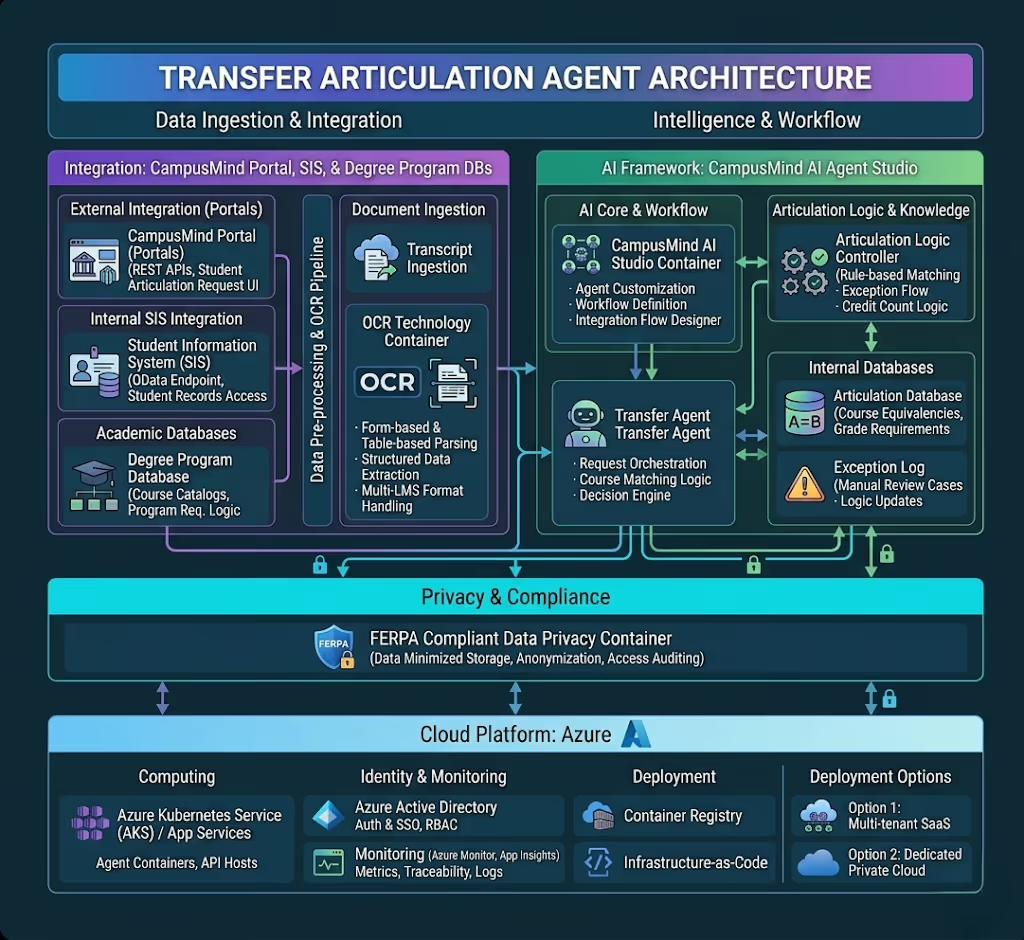
CampusMind’s Transfer Articulation Agent helps make that work faster and more consistent. It reviews transcripts, extracts course details, checks articulation rules, matches prior coursework to internal equivalents, and maps accepted credits against the student’s intended program. When something is unclear, it does not force a guess. It flags the case for staff review.
The result is not just a faster workflow. It is a clearer one — for staff and for students.
What This Agent Does
Transcript Upload: Students or advisors can upload official or unofficial transcripts through the CampusMind portal. The agent can work with PDFs and scanned image formats, which matters because transfer documents do not always arrive in perfect condition.
OCR & Parsing: The agent reads the transcript and extracts the key details staff usually have to pull manually: course codes, course titles, credit hours, grades, terms, and institution information.
Course Matching: The system checks the extracted courses against the institution’s articulation database. It looks for internal course equivalents and applies grade, credit, and transfer rules already defined by the institution.
Program Mapping: Once courses are accepted, the agent maps them to the student’s target program. Core requirements, electives, prerequisites, remaining credits — the pieces start to come together in one structured view.
Report Generation: The agent generates a transfer evaluation report with a course-by-course equivalency table, accepted credits, remaining requirements, estimated program duration, and tuition impact where applicable. Advisors can review it, share it, or use it as part of the final approval process.
Advisor Escalation: Not every case should be automated all the way through. If a course does not match cleanly, if the grade is borderline, or if a special rule applies, the agent flags it for manual review by the right staff member.
Benefits to Staff and Advisors
Less manual transcript review
Faster evaluation turnaround
More consistent application of articulation rules
Reduced workload during peak transfer cycles
Clearer exception routing for cases that need human review
What Students Gain
A faster way to submit transcripts for review
Better visibility into which credits are likely to transfer
A clearer understanding of how prior coursework applies to a target program
More confidence about remaining requirements
Better information for choosing a program pathway and timeline
Connect Student and Advisor Access: Make the Transfer Articulation Agent available through the CampusMind portal and, where needed, connect it with campus systems students and advisors already use.
Set Up Articulation Data: Upload or connect the institution’s articulation database, including course equivalencies, grade requirements, credit rules, and transfer policies.
Customize the Rules: Define how credits should be evaluated. This can include minimum grades, course exclusions, residency requirements, elective handling, prerequisite rules, and any special cases your institution needs to manage carefully.
Launch and Review: Once configured, the agent can begin processing incoming transfer evaluations. Staff can review generated reports, approve clean matches, and focus their time on cases that actually need judgment.